
Submit Your CHOSEN Transmittal Form Below!
Submit this transmittal form for EVERY individual application you submit.
Example: If you submit two applications for one client, then two transmittal forms are required (1 per policy #).
Submit this form IMMEDIATELY after submitting a policy! DO NOT WAIT until later in the day or the next day! MAKE THIS A HABIT.
Contact your Senior Sales Director (SSD) or Chosen Client Services (ClientServices@ChosenIns.com) with any questions regarding submitting this transmittal.
Submit This Transmittal Immediately 🚨
For every client application you submit, you must submit this transmittal immediately after pressing “Submit” in the carrier portal.
Not later.
Not tomorrow.
Not when you get a break.
Immediately.
Delaying the transmittal slows down support, creates confusion, and can delay your commission.
Submission isn’t finished until this transmittal is done.
Finish strong. Every time.
Select Your Team
Date of Submission
Submission Date Guidelines ⏰
When completing the transmittal, enter the official submission date based on the time stamp in the carrier portal — not when you started the application.
Always verify the exact time and date in your portal.
If the final submission occurs after 11:59 PM Central, the submission date becomes the next calendar day.
Example:
If you began the application at 11:30 PM CST on December 31 but did not fully lock it, collect signatures, and receive confirmation of submission until 12:09 AM CST on January 1, the official submission date is January 1.
What matters is the confirmed submission time — not when you started.
Proposed Insured Information
The Proposed Insured (PI) is the person whose name is listed on the application to be covered.
NOTE: If the proposed insured is a child, you must list the child’s name — not the parent’s name.
And remember:
Every child requires their own separate transmittal.
Even if multiple children are submitted at the same time (such as Mutual of Omaha Child Whole Life applications), each child must have an individual transmittal completed.
One insured = One transmittal.
What agents were involved with this policy?
Please identify every agent connected to this case based on their role:
Writing Agent
The agent who personally entered the application and clicked submit in their carrier portal.
Split Agent
The agent whose producer number is officially listed on the application in the “Split Agent” field.
Non-Licensed Generator
An agent who may or may not hold an active license but does NOT have ANY carrier producer numbers yet (not appointed at all). They generated the appointment that led to this client. They receive credit for 100% of the premium generated toward their promotion (in lieu of commission).
Writing Agent
The Writing Agent is the agent who personally entered the application and clicked submit in their carrier portal.
If the Writing Agent's name is not listed below, type it in the blank at the bottom.
Be consistent.
Always enter an agent’s name the exact same way on every New Hire Form and Client Transmittal.
Do not type “Desirae Jackson” one time, “Desi Jackson” the next, and “DJ” after that. This creates duplicates on the leaderboards.
Standardize the way a name should appear — and use that exact spelling every time. Uniform names keep reporting clean and accurate.
Below are the Agent Rank options available. If you are unsure of what rank you are currently at, ask your SSD before submitting this transmittal.
New Associate
Junior Sales Leader
Sales Leader
Sales Director
Senior Sales Director
Junior Regional Director
Regional Director
National Sales Manager
Rank Selection Guidelines
Select the Writing Agent’s current official rank as reflected in ReaganAI (for licensed agents) as of the submission date.
Do not select a pending promotion.
If a promotion (ex: Sales Director) is still awaiting approval and is not yet official in ReaganAI, select the agent’s current active rank — not the anticipated one.
Only officially reflected ranks count.
Split Sales
How Split Sales Works
If anyone helped you close this client or submit this application — or if any split scenario below applies — you must:
Add them as a Split Agent on the carrier application, and
List them as a Split Agent on this transmittal.
Both places. Every time.
Splits create leverage.
They reward generators, compensate closers, and protect the client with expert guidance.
All split policies are 50/50 between two licensed agents in all of the following situations:
1️⃣ Non-Licensed Agent Field Trainings
When a non-licensed agent generates an appointment, every resulting policy must be split 50% with their Immediate Licensed Upline (next in line).
If you’re unsure who that is, ask your SSD.
2️⃣ Licensed Agent + Certified Closer
If a licensed agent generates the appointment and a Certified Closer runs it, the policy is split 50/50 between the generator and the closer.
3️⃣ Personal Policies (New Hires)
Every Chosen new hire's personal policy must be split 50% with the agent who conducted their Orientation Debrief.
Orientation Debriefs are only to be conducted by SSDs or Certified Closers.
4️⃣ Grand Opening Sales
All policies from Grand Opening guests are split 50% with the agent who conducted the Grand Opening.
Grand Openings are only to be conducted by SSDs or Certified Closers.
5️⃣ Assisted Closings
If a licensed agent attempts to close a sale but receives help from another licensed agent — whether with the presentation, quoting, overcoming objections, closing, or completing the application — the policy is split 50/50.
If assistance happens, a split happens.
Pro Tip:
A strong goal for every licensed agent is to become a Certified Closer so you can earn from matchup and split appointments consistently.
Split Agent
If no split applies, leave the field blank.
Do not type “N/A” or “None.”
If the Split Agent’s name is not listed below, type it in the blank at the bottom.
Be consistent.
Always enter an agent’s name the exact same way on every New Hire Form and Client Transmittal.
Do not type “Desirae Jackson” one time, “Desi Jackson” the next, and “DJ” after that. This creates duplicates on the leaderboards.
Standardize the way a name should appear — and use that exact spelling every time. Uniform names keep reporting clean and accurate.
Rank Selection Guidelines
If there is no Split Agent, just skip this question; do not select anything!
Select the Split Agent’s current official rank as reflected in ReaganAI (for licensed agents) as of the submission date.
Do not select a pending promotion.
If a promotion (ex: Sales Director) is still awaiting approval and is not yet official in ReaganAI, select the agent’s current active rank — not the anticipated one.
Non-Licensed Generator(s)
The Non-Licensed Generator is an agent who may or may not hold an active license but does NOT have ANY carrier producer numbers yet (not appointed at all). They generated the appointment that led to this client. They receive credit for 100% of the premium generated toward their promotion (in lieu of commission).
Never list a licensed agent who is appointed with at least one carrier as a Non-Licensed Generator. If an agent has a producer number with any carrier, they will not be considered non-licensed for credit purposes. Click here to review the guidelines carefully before listing a non-licensed generator.
If there is no Non-Licensed Generator, leave the field blank.
Do not type “N/A” or “None.”
Always enter an agent’s name the exact same way on every New Hire Form and Client Transmittal.
Do not type “Desirae Jackson” one time, “Desi Jackson” the next, and “DJ” after that. This creates duplicates on the leaderboards.
Standardize the way a name should appear — and use that exact spelling every time. Uniform names keep reporting clean and accurate.
Non-Licensed Generator #1
Non-Licensed Generator #2
Carrier
Product
Face Amount (Death Benefit Coverage)
How much total coverage is the Proposed Insured (PI) applying for?
Enter the full death benefit amount exactly as shown on the application.
Policy Number
If carrier hasn't produced a policy # yet, select "Pending" and as soon as you get the policy # email it to ClientServices@ChosenIns.com with the name of the client in the subject line.
Application Status
Was this application instantly approved or declined upon submission — or has it since been approved or declined?
If neither applies, select: Submitted.
Draft Dates
List BOTH Initial Draft Date & Recurring Draft Date below!

INITIAL Draft Date
What exact date will the first premium draft to place the policy in force upon approval?
When submitting applications, we recommend offering clients the 15th or the 20th of the month as their draft date.
They may choose another date if requested, but always present those two options first.
Important:
If the policy is issued after the initial draft date listed, the first premium may draft immediately upon issue (unless otherwise specified). All future premiums will draft on the recurring date selected on the application.
Enter the date in MM/DD/YY format.
Example: December 5, 2025 = 12/05/25.
RECURRING Draft Date
On what day of each month will future premiums draft after the initial premium places the policy in force?
When submitting applications, we recommend offering clients the 15th or the 20th of the month as their draft date.
They may choose another date if they prefer, but always present those two options first.
Enter only the day of the month below.
Example: 15th, 20th, 1st, 8th, etc.
Payment Mode Guidelines
Always select Monthly on the application.
If a client prefers to pay less frequently (quarterly, semi-annual, annual), make that change after the policy has been approved and placed in force.
Premium Details
List BOTH Annual Premium & Target Premium below!
Premium-Related Notes
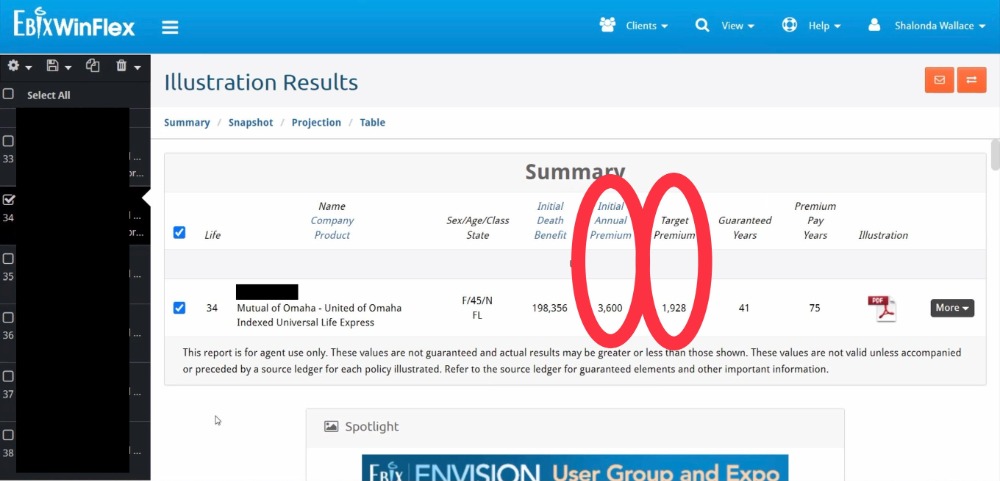
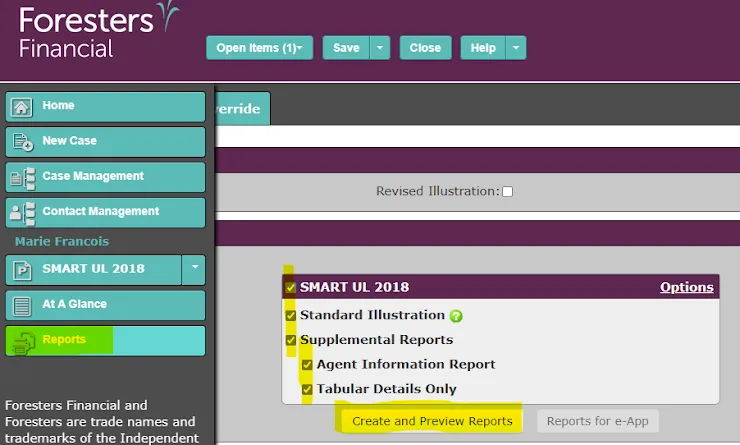
For Indexed Universal Life (IUL) and Universal Life (UL) policies, the Annual Premium and Target Premium may be different. Verify this on this illustration.
For most other policy types (term, whole life, etc.), the Annual and Target amounts should be the same.
For Annuities:
• List the full rollover amount as the Annual Premium
• List 10% of the rollover amount as the Target Premium (this is the amount counted toward promotion)
Annuity Example:
If the rollover is $87,650
Annual Premium = $87,650
Target Premium = $8,765
For Mutual of Omaha, you will find the Annual & Target Premiums in Winflex (shown in screenshot below).
For Foresters, you will find the Annual & Target Premiums in the FULL illustration (shown in screenshot below).

ANNUAL Premium
Annual Premium Guidelines
Life Insurance
Annual Premium = Monthly Premium × 12
Example:
If the monthly premium is $100, then:
$100 × 12 = $1,200 Annual Premium
Annuities
Annual Premium = Full Rollover Amount
TARGET Premium
Target Premium Guidelines
Life Insurance
The Target Premium can be found in the illustration.
Open the illustration and use CTRL + F, then search “Target” to locate the amount.For Indexed Universal Life (IUL) and Universal Life (UL), the Target Premium may be different from the Annual Premium.
For most other policies (term, whole life, etc.), the Annual and Target Premium will be the same.
Annuities
Target Premium = 10% of the Full Rollover Amount
Example:
If the rollover amount is $173,902
Target Premium = $173,902 × 10% = $17,390.20
Important:
Commissions and promotions are based on the Target Premium — NOT the Annual Premium.
Point Of Contact
Point of Contact (POC)
Who is the main person that should receive communication about this application?
This is the individual you will primarily contact regarding underwriting updates, requirements, and policy status.
Examples:
If the Proposed Insured is under 18, the parent is typically the Point of Contact.
If the Proposed Insured is elderly, an adult child may serve as the Point of Contact.
List the primary decision-maker and communicator for this case.
Attach Documents
Customer Service Tips & Best Practices
Fortune Is in the Follow-Up 💰
Closing the sale is step one.
Getting it issued is what gets you paid.
No issue = No commission.
From submission to decision, you stay in touch with both:
• The carrier
• The client
Check carrier portals and email DAILY.
Respond to underwriting requests within 24–48 hours.
Communicate with your client DAILY until the policy is approved, declined, and placed in force.
Silence on either side causes delays.
Client Communication Guidelines – Stay in Touch 📲
Once you hit submit in the carrier portal and complete the transmittal:
Send the “Application Confirmation” text from the Client Communications folder in Million Dollar Scripts (Boards).
Then continue using the scripts in that folder at every stage until the policy is issued and placed in force.
No silence. No guessing.
Set the tone.
Control the process.
Stay proactive.
Smooth underwriting = Faster commissions.
Keep Chosen in the Loop 📩
For every email related to the application — client or carrier —
CC or forward to:
We can’t help with what we can’t see.
Visibility speeds up underwriting. Speed gets you paid.