
Submit Your CHOSEN Transmittal Form Below!
Submit this transmittal form for EVERY individual application you submit.
Example: If you submit two applications for one client, then two transmittal forms are required (1 per policy #).
Submit this form IMMEDIATELY after submitting a policy! DO NOT WAIT until later in the day or the next day! MAKE THIS A HABIT.
Contact your Senior Sales Director (SSD) or Chosen Client Services (ClientServices@ChosenIns.com) with any questions regarding submitting this transmittal.
Select Your Team
Date of Submission
Include the date that you submitted the application for this client according to the TIME STAMP on client's application (check your portal).
If submitted after 11:59PM CENTRAL, use the next date.
For Example: If you started an application at 11:30PM CST on December 31st, but didn't lock it, get all signatures, and fully submit (with confirmation email of submission) until 12:09AM CST on January 1st, your Date of Submission would be January 1st.
Proposed Insured Information
The Proposed Insured (PI) is the client who's name is listed on the application to be protected with coverage.
NOTE: If the proposed insured is a child, list the child's name as the proposed insured below...NOT their parent!!!
Also, EVERY child needs their own transmittal! (Especially with Mutual of Omaha's Child Whole Life where all children are applied for at the same time..they still all need their own transmittal)
What agents were involved with this policy?
Writing Agent
Split Agent
Non-Licensed Generator
Note: The WRITING Agent is the agent that actually keyed in the data entry on their end and hit submit through their portal. So even if someone helped you with the policy so they're listed as a split agent, YOU are the WRITING Agent IF you submitted the policy through your portal.
Writing Agent
If your name is not listed below, type it in the blank at the bottom of the list. ALWAYS type your name the exact same way every time you submit a New Hire Form or Client Transmittal so your name remains uniform across the board. NO TYPOS. Do not type "Desirae Jackson" one time, then "Desi Jackson" the next time, then "DJ" the next time. Standardize on how you want your name to appear on Leader Boards and use that exact spelling every time.
Below are the Agent Rank options available. If you are unsure of what rank you are currently at, ask your SSD before submitting this transmittal.
-New Associate
-Jr. Sales Leader
-Sales Leader
-Sales Director
-Senior Sales Director
-Regional Director
-Senior Regional Director
NOTE: Select Writing Agent's CURRENT Rank as of the date of submission.
For example, the Writing Agent may be waiting for a Sales Director promotion to be approved, but if it is still pending and not official yet, do NOT select Sales Director, you need to select the Writing Agent's CURRENT Rank.
Split Sales
How Split Sales Works
Splits are a blessing! They allow inexperienced agents to receive passive income for simply generating appointments, they allow clients to learn from subject-matter experts who will provide them with the best-suited product(s), and they allow experts to be compensated for their time and expertise.
Policies are split 50% between two licensed agents in the following scenarios:
For every policy that a Non-Licensed Agent generates (field training), each policy must be split 50% with that Non-Licensed Agent's Immediate Licensed Upline (next in line). If you don't know who this is, ask your SSD.
If a licensed agent generates a field training appointment that a Certified Closer runs and closes, all policies generated from that appointment will be split 50% between the generating agent and the closer.
Every Chosen Agent's personal policy must split 50% with the agent that conducted that new agent's orientation debrief. Orientations Debriefs should always done by SSDs or Certified Closers.
All policies generated from Grand Opening guests must be split 50% with the agent that conducted the Grand Opening. Grand Openings should always done by SSDs or Certified Closers.
If a licensed agent attempts to make a sale on their own and is unable to close it for whatever reason, so they receive assistance from a Certified Closer with the presentation, running the correct quote(s), convincing the client to buy (closing), or filling out the application paperwork - if any of this occurs, the generating agent will split the policy 50% with the closer.
-
A great goal for all licensed agents is to strive to become a Certified Closer so that you may receive split sales from matchup appointments!
If someone helped you close this client or submit this application (or any of the scenarios above apply to this application), make sure you added them as a split agent on the actual carrier application and also list them as a split agent below in this transmittal!
If there is no split agent, just skip this question; DO NOT list "N/A" or "NONE", just leave it blank!
Split Agent
If your name is not listed below, type it in the blank at the bottom of the list. ALWAYS type your name the exact same way every time you submit a New Hire Form or Client Transmittal so your name remains uniform across the board. NO TYPOS. Do not type "Desirae Jackson" one time, then "Desi Jackson" the next time, then "DJ" the next time. Standardize on how you want your name to appear on Leader Boards and use that exact spelling every time.
NOTE: Select Split Agent's CURRENT Rank as of the date of submission.
For example, the Split Agent may be waiting for a Sales Leader promotion to be approved, but if it is still pending and not official yet, do NOT select Sales Leader, you need to select the Split Agent's CURRENT Rank.
If there is no Split Agent, just skip this question; do not select anything!
Non-Licensed Generator
The Non-Licensed Agent would be the agent without a writing code that generated this client. They will receive hands-on sales training and credit towards their promotion for generating this policy IN LIEU OF commission.
NOTE: Select Non-Licensed Generator's CURRENT Rank on the date of submission.
For example, the Non-Licensed Generator may be waiting for a Jr. Sales Leader promotion to be approved, but if it is still pending and not official yet, do NOT select Jr. Sales Leader, you need to select the Non-Licensed Generator's CURRENT Rank.
If there is no Non-Licensed Generator, just skip this question; do not select anything!
Carrier
These are the ONLY carriers you should be selling. If you sold a carrier that is NOT listed below, contact Erika Cobb 346-221-1168 IMMEDIATELY!
Product
These are the ONLY products you should be selling. If you sold a product that is NOT listed below, contact Erika Cobb 346-221-1168 IMMEDIATELY!
Death Benefit
How much coverage (death benefit) is the PI applying for?
Policy Number
If carrier hasn't produced a policy # yet, select "Pending" and as soon as you get the policy # email it to ClientServices@ChosenIns.com with the name of the client in the subject line.
Application Status
Was this application instantly approved or declined upon submission (or since been approved/declined)? If not, the status is submitted.
Draft Dates
List BOTH Initial Draft Date & Recurring Draft Date below!

INITIAL Draft Date
On what exact date will the FIRST premium be drafted in order to place this policy in force upon approval?
We suggest when you are submitting the application with your clients, you suggest to them to make their draft date the 15th or 20th of the month. You're able to list another date if they request it, but always give them those 2 options to choose from first.
Note: If the policy gets issued after the initial draft date you listed on the application, the initial premium may draft immediately upon issue (unless otherwise specified), and all future premiums will be drafted on the recurring draft date you listed on the application.
List the date format as MM/DD/YY. For example, if the date is December 5, 2023, list it below as 12/05/23.
RECURRING Draft Date
When will all future drafts occur for this policy EVERY month, AFTER the initial premium has been drafted to place this policy in force?
We suggest when you are submitting the application with your clients, you suggest to them to make their draft date the 15th or 20th of the month. You're able to list another date if they request it, but always give them those 2 options to choose from first.
Simply list the day of the month below. For Example: 15th, 20th, 1st, 8th, etc.
Always list "monthly" on the application. If a client wants to pay less frequently, make the change AFTER the policy has been approved.
Premium Details
List BOTH Annual Premium & Target Premium below!
Premium-Related Notes:
With Indexed Universal Life and Universal Life, the annual and target may be different; otherwise, these numbers should be the same for other types of policies (term, whole, etc.)
For ANNUITIES, list the full rollover amount as the ANNUAL Premium, and list the TARGET Premium as 10% of the rollover (this is what you may count towards a promotion). For example, if you rollover $87,6500 then list $87,650 as ANNUAL & list $8,765 as TARGET.
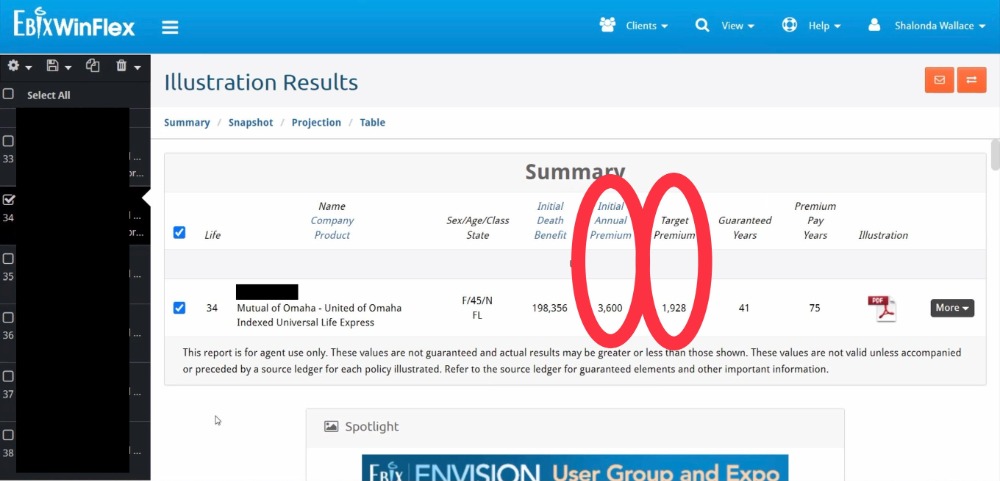
For Mutual of Omaha, you will find the Annual & Target Premiums in Winflex (shown in screenshot below).
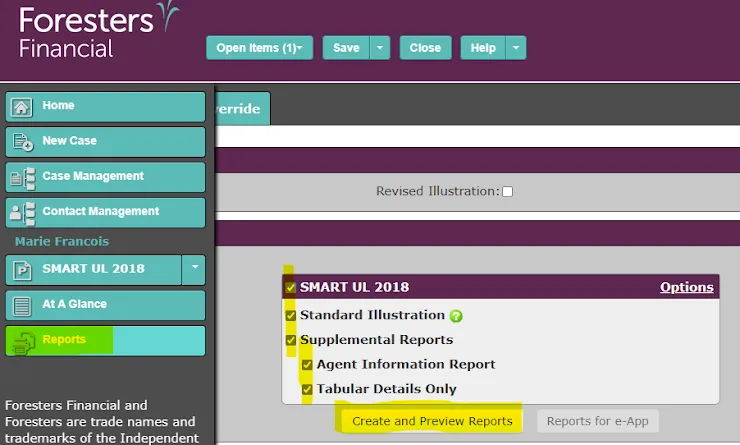
For Foresters, you will find the Annual & Target Premiums in the FULL illustration (shown in screenshot below).

LIFE INSURANCE Annual Premium = Monthly Premium x 12
For example, if your client's monthly life insurance premium is $100, then $100 x 12 = 1,200 Annual Premium
ANNUITY Annual Premium = Full Rollover Amount
LIFE INSURANCE Target Premium can be found by searching the illustration.
Search the illustration (CTRL+F) for "Target" to find the target premium.
FYI: Your commission and promotions are both based off of the TARGET premium, NOT the annual premium.
For Indexed Universal & Universal Life, the Target Premium may be different than the Annual Premium. But for other types of policies such as term and whole, the annual premium and target premium will be the same number.
ANNUITY Target Premium = 10% of the Full Rollover Amount
For example, if your client is rolling over $173,902, then then Target Premium is $173,902 x 10% = $17,390.20
Point Of Contact
Who is the main Point Of Contact that should receive the communications about this application? For Example: For Proposed Insureds under 18, the parent is typically their Point of Contact. And for elderly Proposed Insureds, sometimes their adult children are their Point of Contact.
Attach Documents
Customer Service Tips & Best Practices
Fortune In The Follow Up!
Great job closing a sale! Now the REAL work begins! Your client will NOT get approved and you will NOT receive any commissions unless this case gets issued, and in order to get it issued, YOU have work to do EVERY DAY starting today.
Check your Carrier Portals & Email EVERY DAY for updates on this case. Every update requires your IMMEDIATE attention. When you receive a request for information, you must respond to the Carrier or Chosen New Business with the information requested within 24-48 hours to avoid your client's case from being cancelled.
Note: If you do not have time for the backend administrative work that comes with submitting policies, DO NOT SUBMIT POLICIES! Simply generate by booking field trainings and allow a Certified Closer to submit the policies for you and split you on them. This way, the CFT will be responsible for all paperwork and will ensure you get paid fast with NO extra work from you.
Keep CHOSEN In The Loop!
CHOSEN is here to help you get your client approved and issued fast so you get paid fast! Keep us in the loop so we can help you do so. For ALL emails you receive, reply to, or send to this client and/or the carrier regarding this application, always CC or forward them to ClientServices@ChosenIns.com. This will keep us in the loop as the case is moving through each phase of the underwriting process so we can offer help as needed.
Client Communication Guidelines - STAY IN TOUCH!
YOU MUST COMMMUNICATE WITH YOUR CLIENT DAILY UNTIL THEY ARE APPROVED/DECLINED!!!!
Click the link below NOW & SAVE this link so you'll always have it. This document provides guidance on how to communicate with your client from today until the day they get approved and placed in force (or declined), and beyond.
AS SOON AS YOU HIT SUBMIT BELOW for this transmittal, your client needs to receive a text from you with the first script listed in this document to inform them that the policy has been submitted.
Client Communication Guidelines Document:
https://docs.google.com/document/d/1wIazrZ0H2sTf6c7nSktfx1e4fmTQTgBdK8IUuOoxy5c/edit?usp=sharing
Moving forward for EVERY client application you submit, be sure to submit this transmittal IMMEDIATELY after pressing "submit" in the carrier portal.